My grocery purchase history from online orders over the last few years is sitting in a database, ready for analysis with an LLM - but getting it there turned into a surprisingly interesting journey through the Model Context Protocol (MCP).
I’ve been working on a project called Crosscheckout to collect and analyze online grocery orders. It ingests forwarded receipt emails, parses the attached PDFs, and stores line-item data in a database. It’s a serverless application implemented in TypeScript on AWS Lambda, using SES for ingestion and DynamoDB for storage.
The app already gives me several useful views like:
- frequently bought items,
- product price history, and
- the cost of an “average shop”.
That gave me a nice overview of my shopping history, but I still wanted a more conversational layer for questions that are awkward to pre-build into dashboards.
- “What meals could I make from what I bought this week? I have used the chicken”
- “How often should I subscribe to coffee so I don’t run out?”
- “What do I usually spend on fresh vs packaged food?”
Since I already had the data stored and organised, it felt like I should be able to get an LLM chatbot to query it and answer these questions for me. MCP is an open protocol introduced by Anthropic in 2024 which gives agents access to new tools that they can invoke over HTTP to fetch and interact with data from other systems, so I thought it would be a fun experiment to see if I could add an MCP layer for Crosscheckout.
Building an MCP endpoint on Lambda
Crosscheckout is written in TypeScript and runs on AWS Lambda, so I started from the TypeScript MCP SDK. This awslabs guide for MCP on Lambda was also helpful, illustrating how to implement a lambda MCP handler, but I didn’t want to wrap an existing ‘local’ service. I wanted the Lambda itself to implement MCP.
Getting that part working was fairly straightforward, and some prototyping with Claude Opus got something working in an hour or so.
The lambda itself hosts an express server containing the MCP SDK server, and then implements a shim for handling an API Gateway proxy integration request and forwarding it to express.
I exposed five tools, matching the existing data queries implemented for the web app’s report views. It’s extremely likely that an alternative query interface would be more flexible and allow more targeted queries from agents, but these tools reflect the current conceptual model of the data.
list_receiptsget_receiptget_price_historyget_frequently_boughtget_analysis
Debugging transport and platform behaviour
OAuth
Connecting Cursor as a first client was straightforward. Once it could reach the endpoint, tool calls worked and I could query my shopping data immediately.
ChatGPT was not so simple.
I initially had enough auth to make Cursor happy, but not enough for ChatGPT. I had to add OAuth discovery endpoints so it could register as a client and complete the full flow. After that, ChatGPT reported “Connected to Crosscheckout” but nothing appeared in the UI, and I saw no real tool activity.
MCP Transports
The next rabbit hole was transport support. ChatGPT itself kept nudging me toward SSE or websockets as suitable transports. Various forum posts I found also suggested that it only supported SSE, but websockets was definitely not an option as it’s still only at the proposal stage.
SSE (server-sent events) are not at first glance a good fit for Lambda, which historically has been a request/response model, however since November 2025 API Gateway has added support for response streaming and explicitly calls out SSE as a use case. Unfortunately ChatGPT didn’t know about this, and insisted I would need to use the slightly earlier support for streaming via Lambda Function URLs or switch to a container-based model.
Ignoring that advice, I pointed Opus at some examples and it added the necessary changes to support streamed responses and implemented the SSE MCP protocol as a fallback.
Empty streams
Then all streamed responses were empty - the request was successful, but always returned a zero-byte body. Surely a bug in the newly added streaming handler?
As is often the case, the cause was not immediately obvious and turned out to be unrelated to the implementation of streaming in the Lambda handler. After much manual debugging I located the culprit: my API Gateway deployment trigger conditions didn’t include the streaming config change, so I was testing stale infra.
Once fixed, both transports were working. At this point I also noticed an operational quirk of Lambda for this use case: since each request closes the connection almost immediately, the MCP client tries to reconnect after 1 second to receive any new push events from the server. If I actually wanted to keep the connection open and send push events this wouldn’t be ideal due to Lambda’s instance-per-request model, but in this case the solution I’ve settled on is to pass a retry: 30000 (retry after 30s) back to the client just before closing the connection. This postpones the next polling call and prevents a huge number of pointless calls being made to the endpoint.
Plus plan required
After all the protocol and infrastructure work, the thing blocking me from connecting to ChatGPT was account tier. Custom MCP servers in ChatGPT require at least a Plus/Pro plan. The free tier won’t activate the integration in practice, despite offering the option in the settings panel with no indication that it wouldn’t work.
I upgraded my plan but still had flaky behavior for a while. OpenAI’s Prompt Builder worked straight away, and I eventually added a resources/list handler plus application/octet-stream support because I could see from logs that ChatGPT was requesting both but receiving error responses.
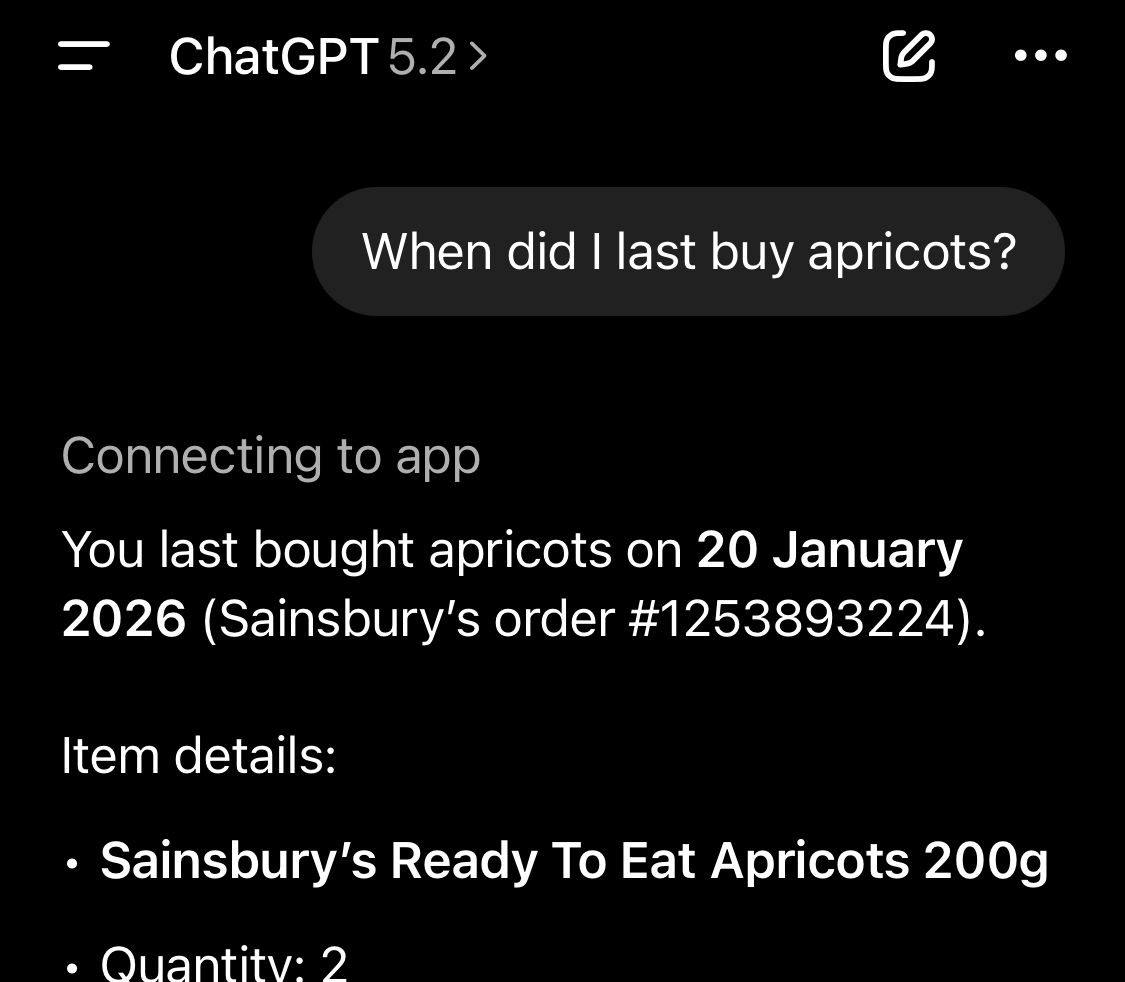
Roughly an hour later (and a lot of refreshing and re-testing), the app appeared and stayed connected. I was finally able to ask about my apricot stock levels!

Was it worth it?
Once the MCP service finally worked, I could ask useful follow-up questions about my own shopping history. If my goal had been only “get grocery data into an LLM once,” then this probably wouldn’t have been worth the effort. I could have just dumped the PDFs into a ChatGPT or NotebookLM project and asked questions about them with no extra work.
But as an engineering exercise it was worth it. It’s been fun to try out some new concepts around MCP, and to play with API Gateway streaming behavior. It’s also been instructive in prompting LLMs to generate some of these implementations when the latest version of the spec was clearly not available before the model training data was captured.
Sampling Bias
The most interesting part has been using the model to identify data gaps and suggest better analyses. For example, asking which products I should buy to allow me to make a wider variety of meals led to ChatGPT identifying that there were no staples like pasta or rice in my ‘frequently bought items’ and recommending I buy some spaghetti. This is sampling frame bias however: the data represents purchase history, but not the current state of my supplies, since I don’t buy longer-life products as often as fresh vegetables with short shelf lives.
Once pointed out, the LLM was able to do a better job of identifying more items in my shopping history, and one suggestion I want to explore at some point is “cuisine entropy” as a way to improve recommendation variety. This article on entropy sampling by Reika Fujimura gives a good introduction to similar ideas in recommendation algorithms.
Code
I’ve not released the code for Crosscheckout at this time, but I do intend to eventually. If you’re interested feel free to give me a shout at [email protected]