Copy Asana projects between workspaces
Ditto takes a complete snapshot of your projects — tasks, subtasks, attachments, custom fields, and assignees — and recreates them faithfully in any destination workspace.
Free to use · No installation required · Maintenance mode as of April 2025
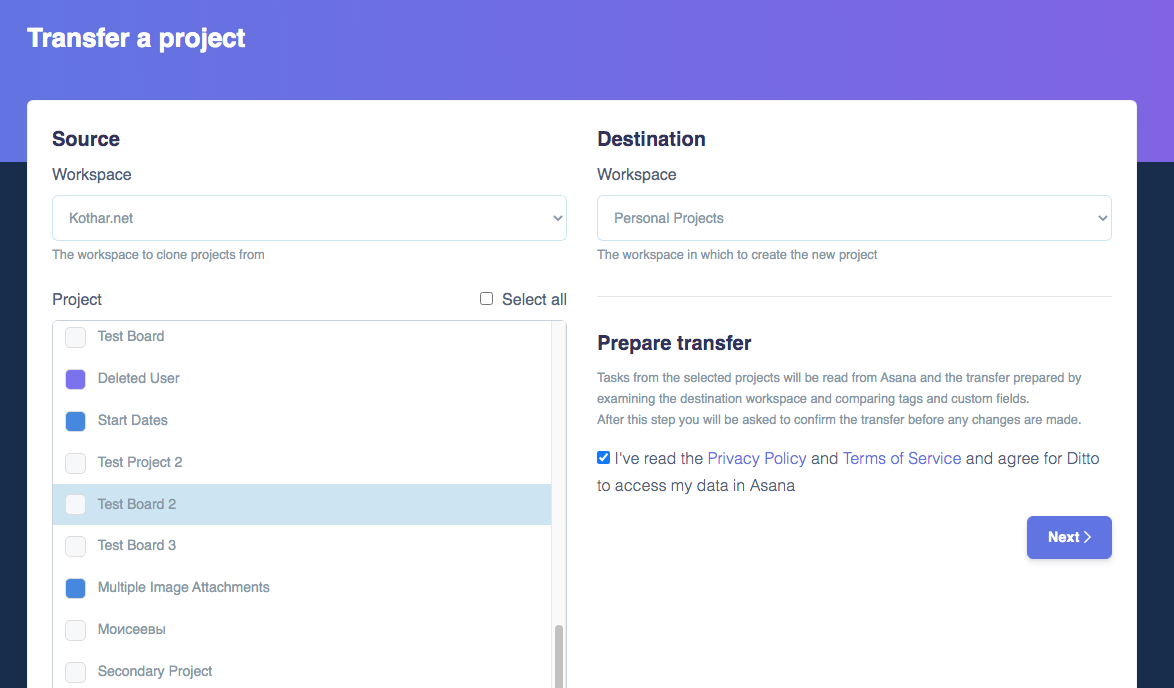
Three steps, one copy
Snapshot
Ditto reads all tasks, subtasks, attachments, tags, custom fields, and assignees from the selected projects in your source workspace.
Reconcile
It compares the snapshot against the destination workspace — aligning custom fields, tags, and users to avoid duplicates and flag any mismatches.
Copy
Tasks are created in parallel for maximum speed. Multi-homed tasks and subtasks are placed correctly; a summary report confirms what was created.
Free to use
Ditto has always been free for the standard copy. A Pro tier was previously available for advanced features like customising the scope of a copy. In April 2025, Pro subscriptions were disabled, and all advanced features were made free for everyone.
Everything Ditto can do
- ✓ Copy projects between workspaces
- ✓ Tasks, subtasks & sections
- ✓ Custom fields & tags
- ✓ Attachments & file transfer
- ✓ Multi-homed task support
- ✓ Comments & task dependencies
- ✓ Recurring tasks
- ✓ User mapping
- ✓ Pre-copy report
- ✓ Customise transferred items
* Note: Rules, Task Templates, and Goals are not supported due to Asana API limits.
Open DittoMove your Asana projects, simply
No installation, no account required. All features are free. Open Ditto in your browser and connect your Asana workspace.